
IV line mix-ups often come down to usability, not effort. I found the same pattern across the studies: when nurses work with cluttered tubing, dim rooms, and pump screens that take too many steps, errors go up and tasks take longer.
Here’s the short version:
- Line labels and organizers helped the most in simulated ICU tests, with 0% identification errors and line ID in about 31 seconds, versus 7.7% errors and about 1 minute 20 seconds at baseline.
- Low light made line ID harder. In one test, standard labels led to 6 of 8 errors in low-light conditions, while a light-based tool had 0 errors.
- Pump design changed nurse performance. One interface took 73 ± 20 clicks and led to 3 ± 2 errors; a centralized setup took 40 ± 3 clicks with 1 ± 1 error.
- Training helped, but it didn’t fix poor design. Smart pump error rates dropped from 30% to 7%, 17% to 3%, and 8% to 1% after training.
- Usability tests focus on a few core measures: task time, errors, near-misses, mental workload, cleaning fit, and how well a device works at the bedside.
If you’re reviewing IV line tools, I’d focus on four things first: pump interface, line identification, line organization, and workflow fit in the ICU, hospital floor, or home care.
A quick side-by-side view:
| Area | What the studies showed | Main takeaway |
|---|---|---|
| Pump interface | More clicks often meant more errors | Fewer steps help nurses work with less strain |
| Line ID tools | Low light increased mistakes with standard labels | Visibility matters, especially at night |
| Labels and organizers | 0% errors in one ICU simulation | Clean line layout can cut search time and mix-ups |
| Usability testing | Tracks time, failures, near-misses, workload | Bedside fit matters as much as device design |
I read this evidence as a simple message: if you want safer IV line work, start by making lines easier to see, trace, separate, and clean.
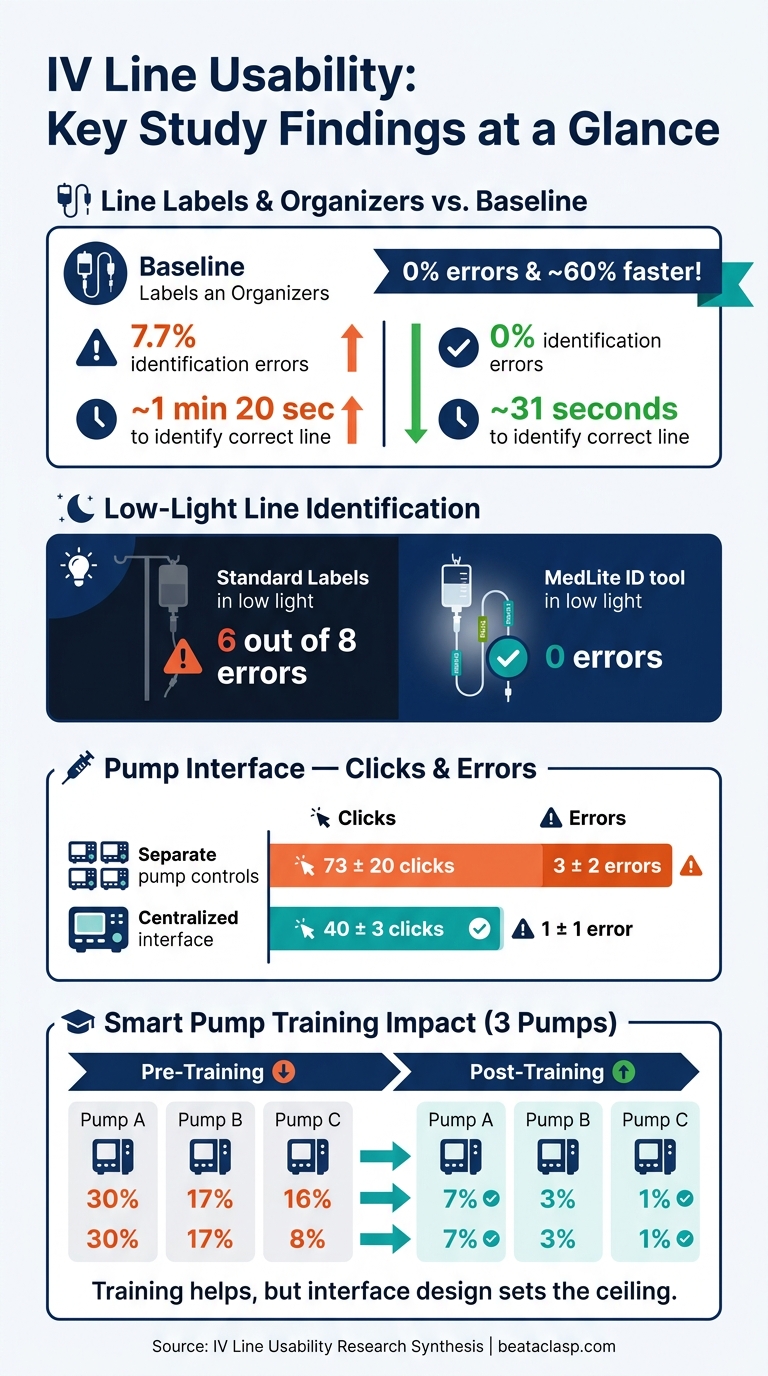
IV Line Usability: Key Study Findings at a Glance
How IV line usability is evaluated
IV line problems tend to get worse when staff are rushed or working in dim light. That’s why these studies try to mirror actual bedside conditions. The goal is simple: see how nurses handle IV tasks when the room is busy, the setup is messy, and the clock is ticking.
Study designs used in hospital and simulation settings
Most IV usability research falls into two groups: formative and summative testing.
Formative studies happen earlier in development. They’re iterative, which means teams test, learn, adjust, and test again. Researchers usually watch small groups of bedside nurses from the right clinical units perform tasks like:
- hanging multiple lines
- tracing tubing
- labeling lines
- responding to alarms
That feedback is then used to refine the device or tighten up the workflow.
Summative studies come later, when the design is close to final. These validation tests use standardized scenarios and predefined success criteria to check whether typical users can complete critical tasks safely and effectively. In one simulation study, all tasks were completed within 3 minutes, though researchers still recorded multiple difficult operations and near-misses.
Crossover designs also show up a lot in this kind of research. In a crossover study, each nurse uses two different setups in randomized order. That helps limit the effect of individual differences. One crossover trial compared a peripheral IV care pack with standard materials and found that procedural time fell from about 295 seconds to 246 seconds, with fewer omissions when the standardized pack was used.
Researchers often pair these studies with direct observation and near-miss tracking. That matters because fatigue, distractions, and line clutter can change performance in ways a tightly controlled task may not fully show.
Usability metrics that matter to clinical teams
No matter the study design, the same measures tend to matter most: time, errors, near-misses, and workload.
Task completion time is the basic starting point. It shows how long it takes to identify a line, program an infusion, or change tubing. From there, researchers look at error types, near-miss events, and missed steps in the workflow. That can include wrong-line connections, programming mistakes, skipped disinfection steps, or failure to complete a required action.
One summative infusion pump evaluation recorded 79 difficult operations, 9 near-misses, and 36 task failures.
Teams also look at mental effort, not just speed. Cognitive workload is often measured with tools like NASA-TLX, while overall usability is commonly scored with the System Usability Scale (SUS). Those tools help show whether a device feels easy to use and efficient during actual care, not just whether a task gets finished.
U.S. regulatory and workflow considerations
In the United States, the FDA expects manufacturers of infusion pumps and related IV devices to address human factors and usability throughout development. That includes identifying high-risk tasks, using representative users, and running simulated-use validation studies in settings that reflect actual use. The FDA has also recommended about 25 participants for this type of validation testing.
Hospital workflow adds another layer. Evaluation criteria usually cover infection control, line labeling, alarm management, and whether a device fits the way care is delivered at the bedside. Those same standards apply when assessing line-organization devices in bedside workflows.
BeataClasp should be evaluated for line control, cleanability, and workflow fit across hospital, ICU, and home-care settings.
sbb-itb-f779e18
Key findings from usability studies on IV line management
These studies point to one thing: design choices at the bedside shape how fast and how safely nurses can work.
Pump and infusion interface testing
Pump errors tend to go up as interface steps pile up. Across pump usability studies, separate pump controls demand more effort than centralized controls. In one simulated task test, nurses using separate pump controls needed an average of 73 ± 20 clicks per task sequence, compared with 40 ± 3 clicks on a centralized interface. They also made about three times as many errors: 3 ± 2 versus 1 ± 1. Task time was similar. That matters in multi-infusion care, where every extra click slows the nurse down.
A heuristic evaluation of infusion pump interfaces found 231 usability violations across 14 design principles. The biggest trouble spots were consistency and language/terminology. That kind of friction doesn’t just annoy users. It changes behavior.
In one study, nurses often worked around confusing safety features instead of using them as intended. 78% skipped the "Change Mode" function entirely and did manual dose calculations instead. 72% had trouble with the "Select New Patient" feature during power-on.
Training helps, but only up to a point. Across three smart pumps, pre-training error rates were 30%, 17%, and 8%. After training, those rates dropped to 7%, 3%, and 1%. So yes, training cuts errors. But the interface still sets the upper limit on performance.
Interface mistakes and line-tracing mistakes also tend to show up together, especially in busy ICU workflows.
Line identification tools in low-light care
Lighting conditions have a direct effect on line identification. In low-light ICU testing, six of eight errors happened when nurses used standard labels. By contrast, a dedicated line identification tool, MedLite ID, produced zero errors under the same low-light conditions. Fatigued nurses also rated it easier to use than standard labels. When the visual setup is clear, tracing gets faster when seconds matter.
Structured line organization shows the same pattern. In a comparative simulated ICU evaluation, line labels and organizers led to 0% identification errors. That beat baseline conditions at 7.7%, smart pump setups at 6.4%, and light-based line ID systems at 3.2%.
The time gap was just as striking. Nurses identified the correct infusion in about 31 seconds with labels and organizers, compared with 1 minute 20 seconds under standard conditions. Put plainly, cleaner visual organization cut both mistakes and search time.
Comparison table: study methods and outcomes
The studies below summarize the main methods and outcomes.
| Intervention | Method | Setting | Main Outcome |
|---|---|---|---|
| Central vs. separate multi-pump interface | Simulated task test | Simulated ICU | 40 ± 3 clicks, 1 ± 1 error vs. 73 ± 20 clicks, 3 ± 2 errors; task time similar |
| Infusion pump heuristic evaluation | Expert review | Lab | 231 violations; consistency and terminology most problematic |
| Smart pump interface comparison (3 pumps) | Usability test | Clinical/simulation | Pre-training: 30%, 17%, 8%; post-training: 7%, 3%, 1% |
| Summative infusion pump evaluation | Simulated-use validation | Simulation lab | 79 difficult operations, 9 near-misses, 36 task failures |
| Line labels/organizers vs. baseline/smart pump/light-based line ID | Comparative simulation | Simulated ICU | 0% errors, 0:31 with labels/organizers vs. 7.7% and 1:20 at baseline, 6.4% and 1:29 with smart pumps, 3.2% and 1:22 with light-based line ID |
| Low-light line ID tool (MedLite ID) | Simulated ADE scenarios | Simulated ICU | 0 errors vs. 6/8 errors with standard labels in low light |
What the evidence means for nurse-led IV line organization
Design features that support safer daily workflow
Pump controls matter. But the layout around the bed matters too.
The same usability rules apply to IV tubing: when lines stay separated, easy to see, and off the floor, nurses can trace them faster and make fewer mistakes. Studies on usability show that nurse-led line organization improves tracing speed and cuts errors. In ICU workflows, organized setups also make line identification faster.
Low-light visibility is a big deal in the ICU. Usability research shows that poor visibility plays an outsized role in identification and medication-access errors. In practice, that means line visibility has to hold up at 2:00 a.m. just as well as it does during the day.
Where IV line organizers fit into usability testing
IV line organizers are now being looked at much like pumps and user interfaces: through structured, nurse-centered usability testing. That shifts them out of the “nice-to-have accessory” bucket and into a more practical role in bedside safety work.
A 2025 open-label clinical trial of an intravenous-line organizer found that most nurses rated the device easy or very easy to use across adult and pediatric patients. In pediatric use, the organizer group also improved bedside line independence.
Beata Clasp is an antimicrobial, latex-free, easy-to-clean IV line organizer for hospitals, ICUs, and home care.
For usability testing, Beata Clasp can be assessed on a few simple but important points:
- Nurse-reported ease of use
- Perceived safety
- Line-tracing efficiency
- Whether it cuts down on reworking or untangling lines during routine bedside care
Evaluation criteria for line-organization devices
When teams assess any IV line organizer for clinical use, the criteria should match the pace and pressure of bedside work. The table below focuses on the factors usability studies link to nurse performance and patient safety.
| Evaluation Criterion | What to Measure |
|---|---|
| Setup time | Seconds to attach and remove from a bed rail or IV pole |
| Line visibility | Ease of tracing each line from pump to patient access point |
| Cleaning workflow | Compatibility with hospital-approved disinfectants; antimicrobial material |
| Floor-contact prevention | Whether lines remain elevated during patient movement and transport |
| Entanglement reduction | Frequency of tangling incidents per shift before and after introduction |
| Staff satisfaction | Nurse-reported frustration, perceived safety, and ease of use |
A small pilot can help teams gather frontline nurse feedback before broader adoption. From there, these criteria can be used at the bedside to judge staff response and day-to-day fit.
Conclusion: Main takeaways from IV line usability research
IV line management is a human factors problem, not just an equipment problem. If devices and day-to-day workflows don’t help clinicians make fast, accurate decisions, error rates go up. That means the fix has to come from human factors, too.
Structured labels and organizers cut identification errors and reduce line-tracing time. And the upside goes past medication errors alone. Better line organization can help cut dislodgement, contamination, entanglement, and falls. For teams ready to move from evidence to practice, the next step is simple: run a short bedside pilot.
Key points for clinical teams and decision-makers
For clinical teams, the takeaway is practical: start small, test in one unit, and scale only if the solution makes workflow safer and easier, such as implementing line management facility-wide. Three priorities stand out:
- Pilot before scaling. Run a 60- to 90-day trial in one or two units.
- Track safety and workflow outcomes. Track incident reports, direct observation, and usability scores.
- Involve bedside nurses from the start. Use bedside nurse feedback as the adoption test.
FAQs
Why does IV line usability affect safety so much?
IV line usability has a direct effect on safety. When tubing gets tangled or messy, small mistakes become much more likely. And in a hospital setting, those mistakes can lead to patient harm.
Poor line management also makes line tracing harder. That can increase the risk of medication errors, misconnections, and accidental dislodgement.
There’s also a simple physical risk: lines that fall to the floor can become tripping hazards and may increase infection risk. Tools like the Beata Clasp help keep lines separated, elevated, and organized.
What should teams measure during IV line usability testing?
Teams should track patient safety and operational efficiency if they want a full picture of performance.
On the safety side, monitor line incidents like dislodgement, tubing entanglement, impingement, nursing interventions, patient harm, and tubing contact with non-sterile surfaces.
On the operations side, look at how much caregiver time goes into managing or untangling lines. It also helps to measure caregiver satisfaction with the equipment. That way, you’re not just asking, “Was the patient kept safe?” You’re also asking, “How much work did it take to make that happen?”
How can a unit pilot an IV line organizer effectively?
To pilot the Beata Clasp the right way, a unit should treat the participating areas as test groups and compare their results against standard care.
Success hinges on a few practical steps: staff training, simulation-based line-tracing drills, competency checks, routine audits, and use of tools like the Training Skills Checklist, Line Organizer Guidelines, and post-trial feedback surveys. These tools help teams track patient safety, staff efficiency, and HCAHPS scores.